Jellybean Giraffe: A Colorful Alphabet for Modern Design
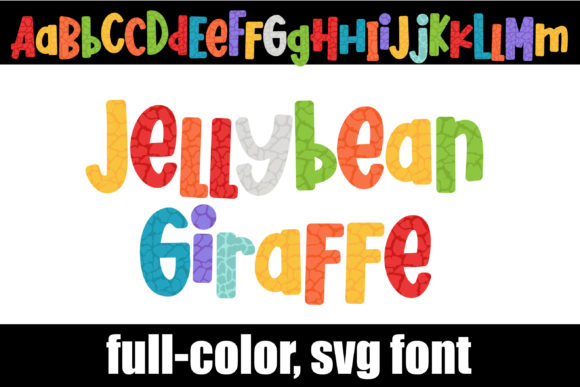
In the crowded landscape of digital assets, finding a design element that truly pops can feel like a challenge. The Jellybean Giraffe font answers that call with an immediate, playful visual impact. This full-color alphabet features a unique giraffe print rendered in a vibrant, mixed jellybean color palette, offering a fresh take on typography for projects that demand attention and a touch of whimsy.
Understanding the Technical Foundation
As an OpenType full-color (SVG) font, Jellybean Giraffe represents a significant evolution in typography. Unlike traditional outline fonts, SVG fonts contain embedded color information, allowing for multi-hued, textured, and complex designs within a single character. Installation follows the standard process for any .otf file, typically via FontBook on Mac or the Control Panel on Windows. A crucial note for designers: the font will appear as a solid black silhouette in non-compatible programs or within font preview windows, even in supported software. You will only see the full color palette when the characters are actively typed onto your document canvas.
Compatibility is a key consideration in any design workflow. At present, full-color SVG fonts like Jellybean Giraffe are supported by a growing list of professional applications, including Adobe Creative Suite, Silhouette Studio, Quark, and Inkscape. It is important to note that the OTF/TTF files are not compatible with Cricut machines, a vital detail for crafters and merchandisers.
Strategic Applications in Visual Communication
The unique aesthetic of this giraffe print alphabet opens up numerous creative avenues. Its inherent playfulness and color make it ideal for specific contexts within graphic design and branding.
- Brand Identity & Logo Design: For brands targeting a youthful, energetic, or creative audience—such as children's products, artisanal food brands, or boutique studios—Jellybean Giraffe can serve as a distinctive logo mark or a standout element in a brand's visual system.
- Marketing & Social Media Graphics: In digital marketing, capturing attention in a split second is paramount. Use this font for bold headlines, Instagram story text, or promotional banners to inject instant energy and stop the scroll.
- Packaging & Editorial Design: On product packaging, it can highlight key flavors, product names, or playful messaging. In editorial layouts, it works beautifully for pull quotes, section headers, or magazine titles aimed at a fun-loving demographic.
Tips for Effective Implementation
Leveraging such a distinctive asset requires thoughtful application to maintain design integrity and effectiveness.
- Prioritize Context and Audience: Evaluate if the playful, textured aesthetic aligns with your project's tone and your audience's expectations. It excels in contexts where creativity and fun are the primary messages.
- Master Visual Hierarchy: Due to its high visual weight, use Jellybean Giraffe sparingly—typically for primary headings or accent elements. Pair it with clean, simple sans-serif fonts for body text to ensure readability and create a balanced hierarchy.
- Ensure System Compatibility: Always test the font within your specific design software before committing to a project. Confirm your application supports color SVG rendering to avoid unexpected results during production.
Thoughtful design is about selecting the right tool for the right job. Assets like the Jellybean Giraffe font provide designers with specialized resources to solve specific communication challenges—whether that's injecting personality, enhancing brand recall, or creating a memorable visual experience. By understanding its capabilities and constraints, you can integrate such creative assets into your workflow to elevate projects from ordinary to exceptional, ensuring your message is not only seen but felt.